
详情
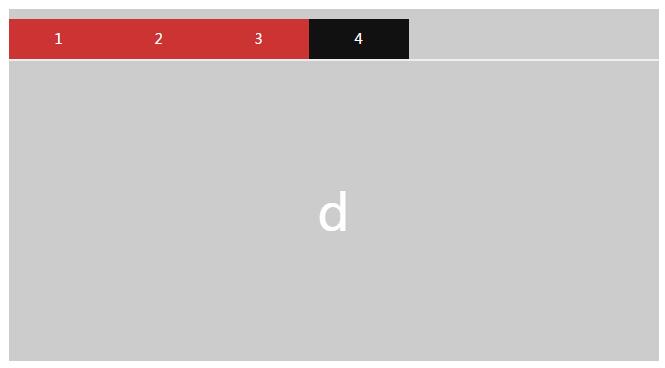
选项卡在网站制作中非常常见,这里模板社小编分析一种简单利用jquery实现tab选项卡效果实例。
div:
<div class="box">
<ul class="nav"><li>1</li><li>2</li><li>3</li><li>4</li></ul>
<div class="out">
<div class="lb">a</div>
<div class="lb">b</div>
<div class="lb">c</div>
<div class="lb">d</div>
<div class="lb">e</div>
</div>
</div>
css:
<style type="text/css">
*{margin: 0;padding: 0;list-style: none;}
.box{height:340px; margin:50px auto;width:650px;}
.nav{width:100%;height: 40px;background:#ccc;}
.nav li{width: 100px;height:40px;line-height:40px;background: #c33;color: #fff;float: left;text-align: center;}
.nav li.jd{background: #111;}
.out{width: 650px;background: #eee;height: 300px;position:relative;}
.out .lb{width: 650px;height: 300px;position:absolute;left:0;top:0;display: none;line-height: 300px;color: #fff;font-size: 50px;text-align: center;}
.out .lb:nth-child(1){background: #111;}
.out .lb:nth-child(2){background: #333;}
.out .lb:nth-child(3){background: #666;}
.out .lb:nth-child(4){background: #ccc;}
</style>
js:
<script src="http://www.web5u.cn/red_style/jquery.min.js"></script>
<script language="JavaScript">
$(function () {
$(".nav li").first().addClass("jd");
$(".lb").first().show();
$(".nav li").click(function(){
$(this).addClass("jd").siblings().removeClass("jd")
var index=$(this).index();
$(".lb").eq(index).fadeIn().siblings().fadeOut();
})
})
</script>
模板社为广大DeDeCMS爱好者和使用者提供DeDeCMS织梦模板、织梦模板下载、DeDeCMS技巧教程、DeDeCMS插件、banner焦点图特效、图片特效、客服侧边栏代码、导航特效、常用软件下载、TAB选项卡特效等素材资源分享下载。